How to Personalise LinkedIn Outreach Messages at Scale Without Sounding Robotic
Learn how to personalise LinkedIn outreach messages at scale with smart templates, prospect research and automation while keeping every message natural.

On this page
Sending LinkedIn messages to potential customers is easy, but getting them to respond and start a meaningful conversation is much harder. Sales professionals often send connection requests, introductions, and follow-up messages, yet many prospects never reply because the messages feel generic or irrelevant.
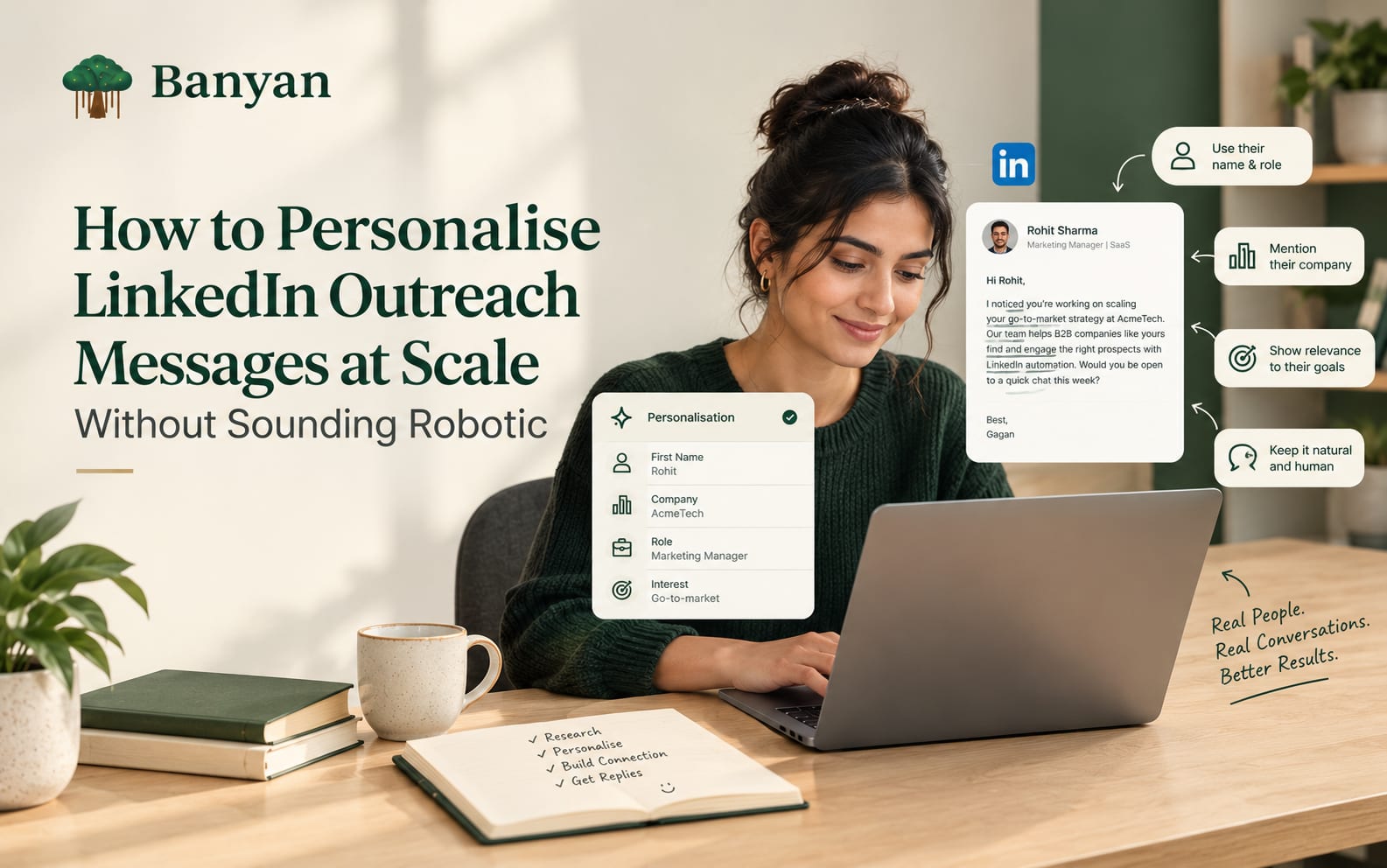
Personalise LinkedIn outreach messages to make your communication more relevant to each prospect without spending hours writing every message from scratch. This can be challenging when a sales team needs to contact dozens or hundreds of prospects every week. While using the same template for everyone saves time, it can make outreach feel impersonal. The key is to find a balance between efficiency and genuine communication by understanding your audience, using relevant details, and adapting messages to each prospect's professional interests or business needs.
The good news is that personalising LinkedIn outreach at scale does not require writing every message manually. It requires understanding which details matter, organising prospects into relevant groups, and using automation carefully. When these elements work together, sales teams can reach more people without making every conversation sound like a copy of the previous one.
Why You Should Personalise LinkedIn Outreach Messages at Scale
People receive sales messages from recruiters, consultants, agencies, software companies, and service providers almost every day. When a message starts with a vague compliment or immediately asks for a meeting, it is easy to ignore.
A personalised message gives the recipient a reason to pay attention. It shows that the sender has considered the person's role, business priorities, or professional interests before reaching out.
For example, consider these two messages.
Generic message:
Hi Rahul, I came across your profile and was impressed by your experience. We help businesses improve their sales process. Would you be available for a quick call?
More relevant message:
Hi Rahul, I noticed your team is hiring for additional sales roles. As teams grow, keeping prospecting and follow-ups organised can become difficult. I thought it might be worth connecting and exchanging ideas about your current process.
The second message connects the conversation to a relevant business situation. It does not guarantee a response, but it gives Rahul a clearer reason to consider the message.
Effective personalisation is not about adding someone's first name to a template. It is about making the message relevant to the person receiving it.
1. Understand Your Ideal Prospects Before Sending Messages
One of the biggest mistakes in LinkedIn outreach is trying to contact everyone who might potentially become a customer. A broad audience makes personalisation harder because different people have different responsibilities, problems, and buying priorities.
Before writing messages, define the type of prospect your team wants to reach.
Consider the following factors:
Job title: Is the person a founder, sales manager, marketing leader, or business development professional?
Company size: Does the business have a small team or an established sales department?
Industry: Does the prospect work in SaaS, consulting, recruitment, manufacturing, or another sector?
Business stage: Is the company expanding, entering a new market, or building its first sales team?
Potential challenges: What operational or commercial problems might your product realistically help address?
These details help you understand why someone might be interested in your offer.
For example, a founder running a small B2B company may want to generate leads without hiring additional salespeople. A sales manager at a larger organisation may care more about maintaining consistent outreach across a team.
Both prospects might be interested in sales automation, but their reasons for considering it are different.
When you understand these differences, you can create more relevant messages without researching every prospect from the beginning.
2. Segment Your Prospects Into Meaningful Groups
Once you have defined your target audience, divide prospects into smaller groups that share similar characteristics.
Segmentation makes large-scale personalisation more manageable because you can prepare a suitable message framework for each group.
For example, a B2B sales team might organise its LinkedIn prospects into these categories:
Founders and business owners: Focus on business growth, lead generation, and making better use of limited resources.
Sales managers: Discuss prospecting workflows, follow-up consistency, and the time required to manage outreach activities.
Marketing leaders: Focus on how marketing-generated leads move into sales conversations and how teams coordinate their efforts.
Agency owners: Discuss managing multiple client campaigns, keeping outreach organised, and reducing repetitive manual work.
Each group should have a different conversation angle. The message does not need to be completely different every time, but its purpose should match the recipient's responsibilities.
For instance, a message to an agency owner could discuss managing outreach across several client accounts. The same opening would be less relevant to a founder who runs an internal sales team.
The key is to personalise the reason for contacting someone, not simply the wording of the message.
3. Research Prospects Without Spending Too Much Time
Personalisation depends on useful information. However, researching every LinkedIn profile for several minutes can make large outreach campaigns difficult to manage.
The solution is to focus on a small number of relevant details rather than collecting as much information as possible.
Before contacting a prospect, look for information such as:
Their current role and responsibilities.
A recent professional post or meaningful comment.
A company announcement or business development.
A hiring trend relevant to your offer.
A professional challenge they have discussed publicly.
A shared industry interest or relevant professional connection.
You do not need to use every detail you find. One relevant observation is often enough to establish a natural starting point.
For example, suppose a sales manager has published a post about the difficulty of keeping follow-ups consistent across a growing team. If your product genuinely helps organise outreach workflows, that post gives you a reasonable starting point for a conversation.
You could refer to the challenge they discussed and ask a relevant question. Avoid turning their post into an excuse for an unrelated sales pitch.
There is also an important distinction between useful research and excessive personalisation. Referencing a professional achievement can feel appropriate, while mentioning unrelated personal details may make the recipient uncomfortable.
Keep your research relevant to the business conversation.
4. Build Message Templates That Leave Room for Personalisation
Templates are useful when a team needs to contact many prospects. The problem begins when the template becomes so rigid that every message sounds identical.
Instead of creating one message for everyone, develop a basic framework with a few sections that can change according to the recipient.
A practical LinkedIn outreach message can include:
Opening: Explain why you are reaching out to this particular person.
Relevant observation: Mention a professional detail or business situation that connects to the conversation.
Value or context: Briefly explain why the topic might be useful to them.
Closing question: Ask a simple, relevant question that makes it easy to continue the conversation.
Here is an example:
Hi Priya, I noticed your company is expanding its B2B sales team. As teams grow, keeping prospect research and follow-ups organised can become more demanding. I work with sales outreach workflows and thought it would be useful to connect. How is your team currently managing prospecting?
This framework provides a starting point, but the opening and main observation should change when the prospect's situation changes.
For a marketing leader, the conversation might focus on coordinating marketing-qualified leads with sales outreach. For an agency owner, it might focus on managing several client campaigns.
Keep templates flexible enough to support genuine differences between prospects.
5. Personalise the Opening Instead of Rewriting Everything
Many sales professionals assume that personalisation means writing an entirely new message for every recipient. That approach can work for a small number of high-value prospects, but it is difficult to maintain across larger campaigns.
A more practical method is to identify the part of the message that most needs to change.
In many cases, the opening sentence carries much of the personalisation.
Compare these examples:
For a founder:
Hi Aman, I noticed your company is expanding into new markets. I was interested in how your team is approaching B2B customer acquisition during that growth phase.
For a sales manager:
Hi Neha, I saw your recent discussion about managing a growing sales pipeline. Keeping outreach and follow-ups consistent across a team can be a challenge as the number of prospects increases.
For an agency owner:
Hi Karan, I noticed your agency works with several B2B clients. I was curious how your team keeps prospecting activities organised across different campaigns.
The underlying structure is similar, but the context changes according to the recipient.
This approach saves time while making each message more relevant. It also reduces the risk of inserting irrelevant personal details simply to make a template look customised.
6. Use AI and Automation Carefully
AI-powered tools can help sales teams research available information, organise prospects, suggest message variations, and manage repetitive outreach tasks. These capabilities can be useful when the number of prospects grows beyond what a team can comfortably manage manually.
However, automation should support personalisation rather than replace the thinking behind it.
For example, an AI tool might help prepare an opening line based on a prospect's professional post. The salesperson should still check whether the observation is accurate, relevant, and appropriate before using it.
A useful workflow looks like this:
Identify prospects who match your target customer profile.
Organise them into relevant segments.
Collect appropriate professional and business context.
Prepare message variations for each segment.
Review personalised details for accuracy.
Send outreach in accordance with LinkedIn's rules and applicable platform limits.
Monitor replies and continue conversations with relevant follow-ups.
This process allows teams to reduce repetitive work without treating prospects as entries in an automated messaging system.
When evaluating LinkedIn outreach automation tools, look for features that help organise prospects, manage outreach workflows, and support relevant communication. Avoid assuming that a tool can automatically understand every prospect's situation or produce an appropriate message without human review.
Automation can help with preparation and consistency. Good judgement still matters.
7. Make AI-Generated Messages Sound More Natural
AI-generated messages can be useful starting points, but the first draft should not automatically be treated as the final message.
A common problem is that generated outreach uses exaggerated compliments, vague business language, or overly formal expressions. These messages may be grammatically correct but still feel unnatural.
For example:
"I was thoroughly impressed by your remarkable professional journey and the innovative work your organisation is doing in the industry."
Unless there is a specific reason for this statement, it sounds excessive for an introductory LinkedIn message.
A more natural alternative would be:
"I came across your work in B2B sales and wanted to connect. I am interested in how teams in your industry approach prospecting."
The second message is straightforward and does not pretend to know more about the recipient than the sender actually does.
Before sending an AI-assisted message, check the following:
Does the opening refer to something accurate?
Is the reason for contacting this person clear?
Can the recipient understand the message quickly?
Does the message sound like something a real salesperson would say?
Is the product or service relevant to the situation?
Is there an unnecessary compliment or exaggerated claim?
Does the closing invite a conversation instead of demanding a meeting?
Remove sentences that add no value. Short, clear messages are often easier to understand than long introductions filled with business jargon.
8. Avoid Common Personalisation Mistakes
Even a well-planned outreach campaign can feel robotic if the details are inaccurate or the message focuses too heavily on selling.
Several mistakes are worth avoiding.
Using the prospect's name without adding relevance
Adding a first name to a generic sales pitch does not make it meaningfully personalised. Explain why the conversation might matter to that person.
Mentioning irrelevant profile details
Not every qualification, achievement, or personal interest belongs in an outreach message. Use information that connects naturally to the professional conversation.
Making assumptions about business problems
A company's growth does not automatically mean it has a lead generation problem. Present possible challenges carefully instead of claiming to know what the prospect is experiencing.
Using the same message for every job title
A founder and a sales manager may have different responsibilities. Adapt the value proposition to the recipient's role.
Making the first message too long
A connection request or introductory message should not contain your entire company story, a list of features, and a meeting request. Give the recipient a clear reason to engage and leave room for a conversation.
Following up without adding anything useful
Sending "Just checking in" repeatedly can make outreach feel automated. A follow-up should provide additional context, ask a relevant question, or give the recipient a natural opportunity to respond.
Avoiding these mistakes makes messages more credible and helps protect the reputation of your sales team.
9. Write Follow-Up Messages That Continue the Conversation
Personalisation should not stop after the first message. Follow-ups also need to reflect the conversation and the information available about the prospect.
If someone replies with a question, answer that question directly rather than returning to a prewritten sales sequence.
If a prospect accepts your connection request but does not respond to the initial message, a thoughtful follow-up may be appropriate after a reasonable interval. The timing should depend on the context, the prospect's response, and your outreach process rather than an arbitrary number of repeated messages.
For example:
Hi Priya, I wanted to follow up on my earlier message about managing outreach as sales teams grow. I would be interested to know whether your team handles prospecting centrally or whether individual sales representatives manage their own workflows.
This message returns to the original topic and asks a specific question.
Compare it with a message such as "Hi Priya, following up again. Did you see my previous message?" The second version adds little value and places the emphasis on the sender rather than the recipient.
A useful follow-up should make the next step clearer, not simply remind someone that a sales message is waiting.
If a prospect declines or asks not to be contacted again, respect that request. Personalisation does not justify repeated unwanted outreach.
10. Measure Whether Your Personalisation Is Working
A personalised message is not successful simply because it contains a company name or a reference to a recent post. The real question is whether the approach helps your team start relevant conversations with suitable prospects.
Track a few practical metrics to understand what is working.
Connection acceptance rate: Shows how often recipients accept your connection requests. Results can vary by audience, profile credibility, and campaign relevance.
Reply rate: Helps you understand whether the message gives recipients a reason to respond.
Positive reply rate: Separates genuine interest from neutral replies, refusals, or requests to stop contacting someone.
Qualified conversations: Shows whether outreach is reaching people who match your intended customer profile.
Meetings booked: Helps connect outreach activity with potential sales opportunities.
Time spent per qualified conversation: Indicates whether the process is becoming more efficient without sacrificing relevance.
Review results by prospect segment and message approach. If messages to founders receive positive responses but messages to another group do not, examine the audience, opening line, offer, and timing before making assumptions.
Do not judge a campaign using reply rate alone. A message can generate many replies but few qualified opportunities. The purpose of B2B outreach is to start relevant business conversations, not simply to increase message activity.
11. Choose an Outreach Tool That Supports Your Workflow
As outreach grows, managing prospect information, message variations, follow-ups, and campaign performance manually can become difficult.
The right software can help organise these activities, but features should be evaluated according to your team's actual needs.
Before choosing a tool, consider:
Prospect management: Can your team organise and review relevant prospect information?
Personalisation support: Can you adapt messages to different roles and business situations?
Workflow management: Can you keep track of outreach activity and follow-ups?
Reporting: Can you review responses and identify which approaches produce qualified conversations?
Ease of use: Can team members use the workflow without unnecessary complexity?
Data handling: Does the tool provide appropriate transparency and controls for managing prospect information?
Platform compliance: Does the workflow respect LinkedIn's applicable rules and restrictions?
Do not choose a tool simply because it promises to send more messages. A large volume of irrelevant outreach can waste time and damage your brand's reputation.
Prioritise tools that help your team work consistently while preserving the ability to review messages and respond thoughtfully.
How OutPilot Can Fit Into a LinkedIn Outreach Workflow
For B2B companies that want to make LinkedIn prospecting more manageable, an outreach platform can help organise activities that would otherwise require repeated manual effort.
GetBanyan's OutPilot is relevant to teams exploring LinkedIn outreach and sales automation. It can be considered as part of a broader process for organising prospecting and outreach activities.
The important point is to choose software according to the way your sales team works. Before adopting any tool, assess its current capabilities, available controls, reporting features, and suitability for your intended workflow.
A practical approach is to begin with a clearly defined audience and a small set of message variations. Review the quality of the conversations generated, identify what needs improvement, and refine the process before expanding it.
The aim is not to automate every interaction. It is to reduce repetitive work so sales professionals can spend more time understanding prospects, answering questions, and building relationships.
Conclusion
Personalising LinkedIn outreach at scale requires more than inserting names into templates or using AI to rewrite the same message. It starts with understanding your audience, identifying relevant business context, and giving each prospect a genuine reason to engage.
Segmentation, flexible message templates, careful research, and responsible automation can make the process easier to manage. Reviewing replies and qualified conversations helps you understand whether the approach is producing useful results.
Most importantly, personalisation should be accurate and relevant. If a message sounds like it could have been sent to anyone on LinkedIn, it probably needs more thought.
The best approach is to automate repetitive tasks while keeping the message, judgement, and conversation centred on the person receiving it. That is how sales teams can expand their outreach without losing the human element that makes professional communication effective.
Frequently asked